distribot — your streak, gamified

Show up. Grow up. Every day.

You post wherever you already post. distribot turns doing it regularly into a small game: set a weekly goal, check off every post you made, and watch your penguin grow with your streak.

See how it works

For iPhone. Free — no ads, no subscription, no in-app purchases.

The loop

You post. You check it off. Your penguin grows.

Setting up takes three steps and no account: you pick how often you want to post each week, you check off your first post, and you give your penguin a name. From then on, every post you actually made you check off in distribot — and every check-off is a point on your streak.

distribot never counts for you. It only knows what you tell it, which is exactly why the streak is worth something.

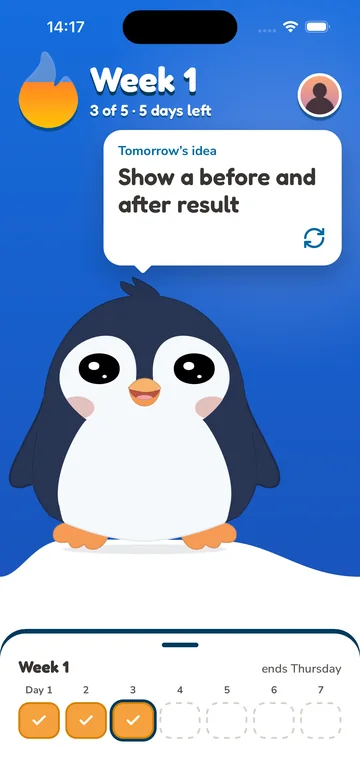
The distribot home screen: three weeks in a row, two of three posts checked off this week, the check-in button, and the penguin in its igloo.
What you get

A real game underneath the habit.

A goal you set yourself

Two posts a week? Five? You choose your weekly target when you first open the app. Nobody sets it for you, and a small number is a perfectly good number.

A streak that stays honest

You check off the posts you actually made. Nothing is inferred, estimated or filled in for you, so the only thing your streak can measure is what you really did.

A missed week costs you nothing

No red, no penalty, nothing taken away. A week you don't hit is simply a week that doesn't count — you pick it up again whenever you're ready.

Cosmetics, and an igloo to fill

Every week you hit your goal unlocks the next item: a hat, a scarf or glasses for your penguin, or a piece of furniture for its igloo. Your progress is not a number in a table — it sits in front of you wearing a hat.

The igloo screen: the furnished igloo above, and below it the inventory with the wardrobe and every item unlocked so far.
Good to know Version 1.0, the one in the App Store today, connects to no account at all: you post on the platform you already use, then check it off here. Version 1.1 is planned to add an optional TikTok connection.
How it works

Three steps, and you decide every one of them.

distribot never counts for you and never posts behind your back. It knows what you tell it — and that is the whole design.

  1. 1 You post — wherever you normally post. Today distribot is not involved and never sees it. Version 1.1 is planned to let you publish to TikTok from inside the app instead, if you want that.
  2. 2 You check it off in the app. You mark it done on the home screen — and if you forgot an earlier day this week, you can still tick it off in the week row.
  3. 3 Your penguin eats. The check-off is the feeding — nothing else to play, nothing else to tap.
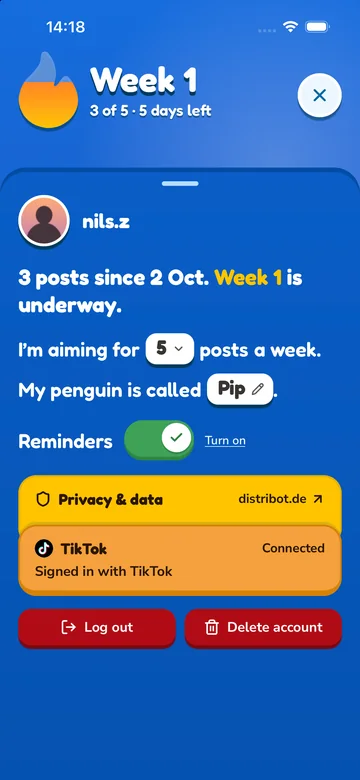
The profile screen: the penguin with the name you gave it, the streak counted in weeks, the weekly goal, the weekly reminder with day and time, and links to Privacy and Support.
A first look

Three screens from the app.

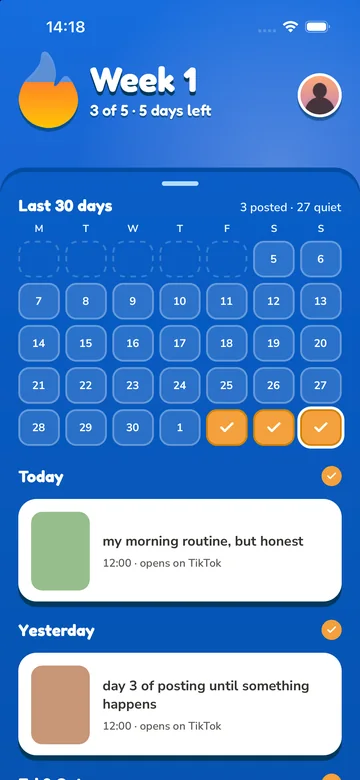
These are real screenshots from the build, not mock-ups: the home screen, the igloo and the profile.

  • The distribot home screen: the penguin sits in its igloo wearing a beanie, tuxedo and glasses. Below it: three weeks in a row, never a week missed, two of three posts checked off this week, the check-in button, and an idea of the day.
    Your penguin and your streak

    How many weeks in a row you have kept going, how far along this week is, and one button to check a post off.

  • The igloo screen: the furnished igloo with a fireplace, shelves and a sledge, and underneath the inventory with the wardrobe and everything unlocked so far.
    Your igloo, your way

    Everything you have unlocked, placed the way you like it — and the penguin wearing whatever you picked out for it.

  • The profile screen: the penguin with the name you gave it, the streak in weeks, the weekly goal with plus and minus buttons, the weekly reminder with day and time, and links to Privacy and Support.
    Your goal and your reminder

    Change your weekly goal whenever it stops fitting, and set one weekly reminder. Privacy and support are one tap away.

Straight answers

What distribot does — and doesn't.

Being precise about this matters more than a longer feature list. Version 1.0, the version in the App Store today, connects to nothing: you post, then you check it off. Version 1.1 is planned to add an optional connection to TikTok, so you can publish to your own account from inside the app. It has not been released. Either way, nothing below changes without you switching it on.
It doesn't post on a schedule.

No queue, no automation, nothing published while you are not looking. If something goes out, it is because you pressed the button in that moment.

It doesn't read your accounts.

No feed, no follower count, no analytics, no post history. Version 1.0 has nothing to sign in to at all. A connection in 1.1 would be for publishing only: it would fetch just what TikTok needs the app to show you before you confirm a post — your account name and the posting options your account allows.

It doesn't collect your data.

No distribot account, no server, nothing sent to us. Your goal, your streak, your penguin and its igloo live on your iPhone. Delete the app and they go with it.

It doesn't sell you anything.

No ads, no subscription, no in-app purchases. Everything there is to unlock, you unlock by showing up.

Good to know.

An iPhone app that turns posting regularly into a small game. You set a weekly goal, check off each post you made, and your streak — and your penguin — grow with it.
Not in version 1.0, the version in the App Store today: it connects to no account and publishes nothing. You post yourself, wherever you like, and check it off afterwards. Version 1.1 is planned to add an optional connection that lets you publish to your own TikTok account from inside the app — it has not been released, and checking off by hand will stay a complete way to use distribot.
Because you tell it. You mark the post as done on the home screen — that is the only signal the app ever gets. Nothing is tracked, and no account is watched in the background.
Nothing. There is no red screen, no penalty and nothing taken away — a week you don't hit simply doesn't count towards the next unlock. You pick it up again whenever you're ready.
Every week in which you hit your goal unlocks the next item — a hat, a scarf or glasses for your penguin, or a piece of furniture for its igloo. There is no shop and no currency, so nothing can be bought.
Not straight away. The home screen shows the current week as a row of days, and you can still tick off yesterday or the day before. Further back than that, no — otherwise the streak would stop meaning anything.
On your iPhone and nowhere else. There is no account, no sign-in and no server. If you delete the app, everything goes with it. The details are in our Privacy Policy.

Something else on your mind? Support and contact.

distribot

A small game for people who want to post regularly. For iPhone. No distribot account, no ads, nothing to buy.

distribot is an independent product. It is not endorsed by, sponsored by or affiliated with any social media service or platform operator. All trademarks named anywhere on this site belong to their respective owners and are used descriptively only.

© 2026 Aron Taner · distribot